
- New feature (usage): Add usage stats for tracking the popularity of components/settings
- Bug fixes (app): Hide the overview button if no local index is available
- Bug fixes (mailviewer): Fix disappearing mail viewer menu
- New feature (webmail): Integrate startdesk as a webmail “folder”
- Bug fixes (recursive_dynamic_builder): Lint errors fix
- Bug fixes (startdesk): Remove timeperiod-specific wording
- Visual changes (start): Fix breakpoints for mobile
- Visual changes (start): Condense layout in heading area
- Visual changes (start): Move section title to the top bar for mobile
- Visual changes (start): Clean up and remove unused code
- Visual changes (start): Remove heading and adjust the space in top area
- Bug fixes (calendar): Ensure we show recurring events correctly color-tagged
- New feature (builder): Remove unused var
- New feature (builder): Runbox dynamic builder research
- New feature (startdesk): Implement folder selectors
- New feature (start): Add folder selector.
- Visual changes (startdesk): Make folder selector a little more bearable on mobile
- Bug fixes (start): Fix case sensitivity for address matching
- Visual changes (start): Improve responsivity for mobile screens
- Bug fixes (contacts): Only sync once during import of many contacts
- New feature (sentry): Include user data in error reports
- Bug fixes (account_security): Fix modal typo s/reasions/reasons/
Brand-new Account Security screen, and numerous other improvements and bug fixes.
- Bug fixes (account security): Total number of cols is 6 and not 7
- New feature (account): Add a way to view sub-accounts associated with a product
- New feature (account security): Add missing main app password toggle
- Bug fixes (account security): List FTP last on services
- New feature (account security): Update last logins labels. show success/fail insteac of 1/0
- New feature (account security): Hide account security access control
- Bug fixes (account security: Suppress always block button
- Bug fixes (mailviewer): Show missing From content when not using local index
- Visual changes (payment): Remove 20th Anniversary special offer promotion.
- Bug fixes (account): Invert the condition checking for the limited time offer
- Bug fixes (account-timer): Make sure RunboxTimer is always properly initialized
- Bug fixes (webmail): Fix URL navigation
- Bug fixes (cart): Allow purchases (with warnings) even if unavailable products are in the cart
- New feature (mailviewer): Add select-all option for selecting messages
- Bug fixes (contacts, calendar): Warn user on incorrect import file types
- Bug fixes (mailviewer): Stop select-all-menu from jamming
- Bug fixes (cart): Fix an exception upon viewing an empty cart
- Bug fixes (cart): Fix a cart bug when two separate, identical products appear in it
- Bug fixes (calendar): Editing an item displays the correct times
- Visual changes (payment): Add 20th Anniversary special offer promotion.
- Bug fixes (account security): Don’t display bottom pane “invalid password” msg
- Bug fixes (start): Comment out panel mockups from the view
- Bug fixes (webmail): Select loaded row url correctly on refresh
- New feature (account security): Update account security menu link
- Bug fixes (account security): Use routerLink in the account security link
- Bug fixes (account): Don’t require Micro accounts to purchase addons for own domain usage
Webmail improvements including Saved Searches, which lets you instantly bring up results of previously saved search terms.
- New feature (identities): Order From entries by priority
- New feature (dkim): Add a note about selector2 and when it will become active
- New feature (account security): Improve password validation and error messages on Account Security to avoid confusion
- New feature (dialog): Allow submitting dialogs with Enter/Return key
- Bugfix (canvastable): Make sort icons show actual sorting direction
- New feature (webmail): add a way to save and reuse searches
- Visual fix (app): Remove obsolete instances of mat-icons
- Bugfix (startdesk): Fix linter and policy errors
- Bugfix (folders): Improve folder count reliability in some edge cases
Improved and more consistent performance, a new menu for marking messages read and flagged, improved Contacts layout, and many other fixes and improvements.
- Bugfix (webmail): Update local (non-index) folder counts on refresh
- New feature (login): Set inputmode to show email and numeric keyboards on mobile as appropriate
- New feature (webmail): Always show popular recipients component if enabled, even with no local index
- Bugfix (account): Redirect domain renewals to domain registration app
- Bugfix (webmail): Ensure folder counts are updated after read/unread
- New feature (webmail): Change icons and tooltips when a message is deleted from trash
- New feature (compose): Add debug logs for measuring impact of recipient loading
- New feature (folder): Speed up folder size calculations
- New feature (webmail): Separate read/unread, flag/unflag in multi-menu
- Bugfix (menu): Hide account security until its backend issues are resolved
- Bugfix (mailviewer): Load mailpane status (vert/horiz) on page load
- Bugfix (compose): Set focus in textarea for replies
- Bugfix (contacts-app): Correct filtering options background color
- Bugfix (contacts-app): Fix positioning of email contact icon
- Bugfix (contacts-app): Make middle column width adjust to its content
A brand new Contacts interface, one-click view all email by recipient, contact avatar support, and many other improvements and bug fixes.
- New feature (app): Implement indicators for multipart background activities
- New feature (contacts): Add background activity indicator
- Bugfix (mailviewer): React to avatar settings as soon as they change
- New feature (contacts): Add a tooltip to picture upload button if gravatars are disabled
- Bugfix (contacts): Hide pictures in contact details if they’re disabled
- Bugfix (identitys): make main identity email field read only
- New feature (contacts): Add avatar settings to Contacts settings
- Visual fix (compose): Show suggested recipients with light gray background. (#693)
- Bugfix (webmail): Redraw folders properly after new item completed.
- Bugfix (contacts): Scroll details to top when new contact is selected
- New feature (contacts): Add settings to adjust avatar use in the app
- New feature (mailviewer): Use pictures from contacts when available
- New feature (contacts): Allow uploading/deleting contact pictures
- New feature (contacts): Show pictures/gravatars on contact details page
- New feature (mailviewer): Show gravatars when available
- Visual fix (webmail): Add a tooltip for webmail settings button
- Bugfix (webmail): Make sure we can still use saved searches when no folder is selected
- Bugfix (contacts): Make contacts draggable again
- Bugfix (webmail): Fix switching folders not working in some cases
- New feature (contacts): Add hints to columns indicating what they’re for when they’re empty
- Visual fix (contacts): Minor layout fixes to contactlist
- Visual fix (contacts): Make the 3-column layout more rigid
- Bugfix (contacts): Fix a template crash when deleted contacts exist as group members
- Visual fix (calendar-app): Side-nav menu styles fix
- Visual fix (contacts-app): Side-nav menu styles fix
- Bugfix (contacts): Make contactlist scroll independently of contact details
- New feature (webmail): Show folder count for drafts
- New feature (webmail): Add webmail settings, allowing the disabling of popular recipients
- Visual fix (webmail): Move message action menu to middle column
- Visual fix (compose): Differentiate “Recently used” from recipients
- Visual fix (compose): Differentiate “Recently used” from recipients
- Bugfix (compose): From-specific reply-to addresses saved/stored if setup
- New feature (contacts): Add a way to edit group members from the group page in mobile view
New features such as listing messages by recipient, recently used recipients on Compose, and several other improvements.
- New feature (compose): Compose now accepts pasting email lists recipients
- Bug fixes (common): Fix edge-case email address (list) parsing
- Bug fixes (compose): Different positions for action buttons for mobile and desktop
- Bug fixes (compose): Push draft action buttons further apart
- Bug fixes (webmail): Only recount folder unread counts after content change
- New feature (webmail): Reset search when switching folders
- Bug fixes (compose): Make layout more responsive
- New feature (webmail): Add a list of popular email recipients to the sidebar
- Bug fixes (compose): Update recipient suggests whenever searchindex is updated
- New feature (multiple_msg_unread): Replace endpoint that marks multiple messages as unread/unflag
- Bug fixes (compose): Update angular deprecated recommendations
- Bug fixes (mark_multiple_msgs): Update before the request is completed
- Bug fixes (mark_multiple_messages): Try to use messageFlagChangeSubject.next to fix e2e errors
- Bug fixes (compose): Make sure suggested contacts are shown with their names
- Bug fixes (compose): Make sure we can still drag and drop suggestions to CC/BCC and have them show up
- Bug fixes (compose): Reload CC and BCC contents properly
- New feature (compose): Allow drag-and-drop for suggested contacts
- New feature (compose): Keep feeding the suggestion list after some contacts are selected
- Bug fixes (webmail): Make switching to the current folder a no-op
- Bug fixes (compose): Show only one suggestions bar per compose window
- Bug fixes (compose): Make sure profiles are loaded correctly regardless of races
- Bug fixes (compose): Cope with reply-to field in new TO format
- Bug fixes (compose): Ensure we cope with CC/BCC emails containing a comma
- Bug fixes (compose): Re-add code lost in cherry picking/merging
- Bug fixes (compose): Cope with replying to emails where From name contains a comma
- Bugfix (webmail): Make sure the URL fragment updates after closing an email
- Bugfix (webmail): Prefer contact recipients over searchindex recipients
- Bugfix (webmail): Visually scroll the message list when using the up/down keys
- Bugfix (contacts): Contact updates now appear in compose window directly after update/addition
- Bugfix (webmail): Update contacts cache separately from search index contacts
- Refactor (compose): Remove dead code / simplify code
- Test (e2e): Ensure localSearchPromptDisplayed is set upon closing the dialog
- Test (webmail): Adapt test to new structure. Prefer contacts over searchindex
Runbox 7 enhancements and bug fixes, including better navigation, improved message handling, and a Welcome Desk with common tasks for new and existing users
A full changelog can be seen directly in the app at Runbox 7.
- New feature (webmail): Highlight currently “opened” email in mail list
- Bugfix (webmail): Fix up/down navigation in maillist
- Bugfix (webmail): Close mailviewer when email is deleted via multi-select operation
- Bugfix (webmail): Don’t “check” emails in folder view unless actually clicking on the checkbox
- Bugfix (webmail): Display selected-mail operations whenever more than one message is selected
- Bugfix (messagetable): Display time instead of the date for messages received after midnight
- Bugfix (mailviewer): Store message list view settings in browser
- Bugfix (mailviewer): Grow HTML view to proper size right away
- Bugfix (contacts): Make sure we’re not adding duplicate contacts to groups
- Visual fix (mailviewer): Increase the minimal width of canvastable columns
- Visual fix (welcome): Add note about how to return to Welcome Desk.
- Visual fix (welcome): Make Welcome Desk a flexbox. Use routerlinks where applicable.
- Visual fix (mailviewer): Increase the minimal width of canvastable columns
- Bugfix (styling): Fix breakpoints for iPad Pro
- Bugfix (compose): Ensure we can forward emails with no To or Subject
- New feature (login): Add password reset link to login window
- Bugfix (canvastable): Make it possible to open email from the bottom of the screen
- New feature (login): Add password reset link to login window
- Visual fix (login): More modern look to the login window
We are extremely pleased to be able to announce that the Runbox 7 Calendar is now in beta test.
You may be aware that Runbox for a while has provided a calendar (CalDAV) service for calendar clients such as Outlook, Thunderbird Lightning, and macOS Calendar.
If you’ve previously used our CalDAV server you’ll be pleased to be able to finally use it through the web interface, not needing a separate program anymore.
Calendar features
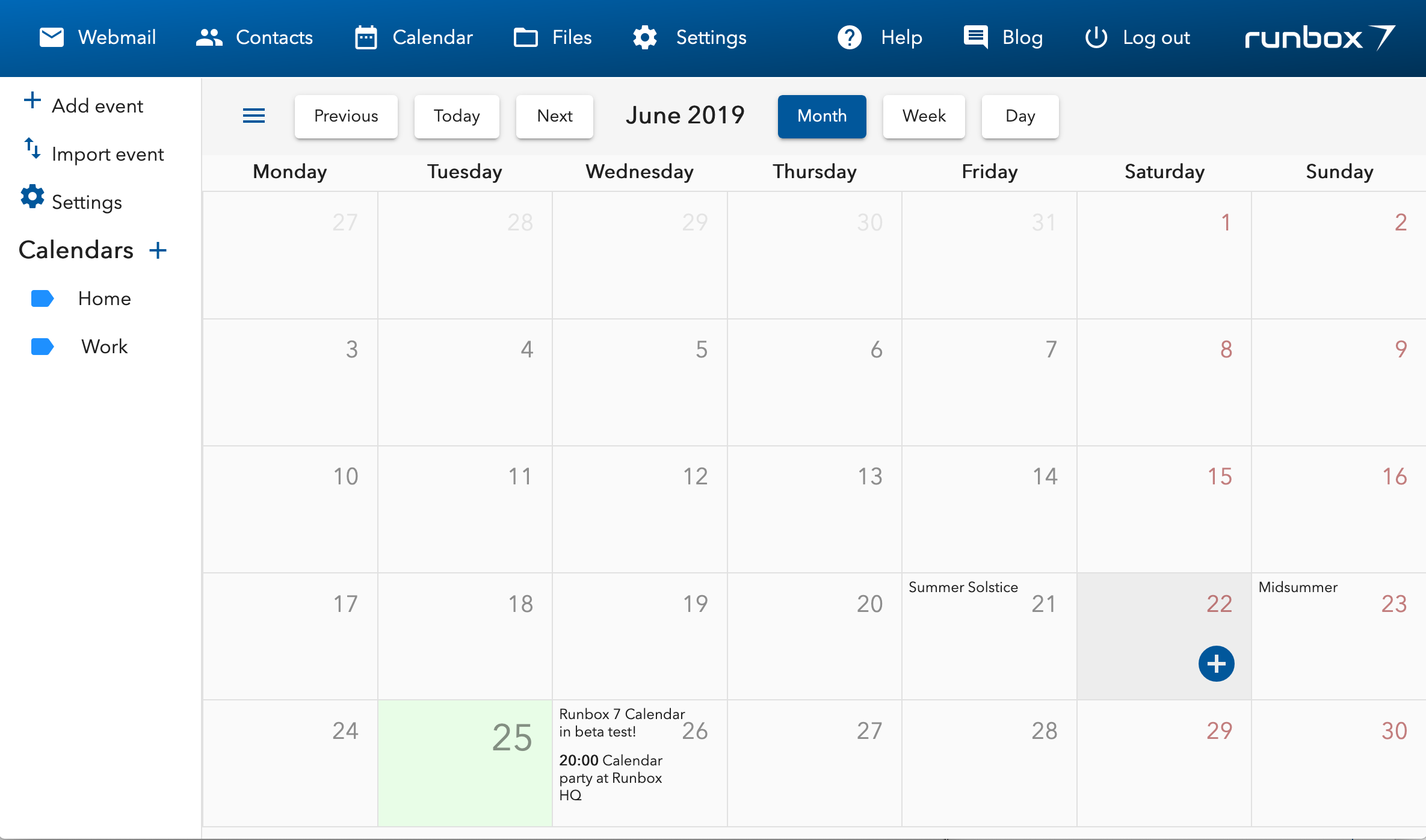
The Runbox 7 Calendar currently offers month, week, and day views, you may add and edit events, and perform other basic actions.
It can also be synchronized with your other programs and devices by setting them up with our CalDAV service.
As this is still a Beta, not everything that your own calendar program can do will be available in the Runbox 7 Calendar quite yet. One notable missing feature is Tasks (TODOs) support – this will be coming later on as a separate feature.
We invite you to try it out by logging into Runbox 7 and clicking Calendar in the main menu.
And let us know what you think over in the Runbox 7 Forum!
It is our pleasure to announce that the new Runbox 7 Contacts is available in open beta test!
If you’re already using Runbox 7 you may have noticed them already, and if you aren’t — here’s another reason to try it: Runbox 7 Contacts combines the best of the Runbox 7 web interface with the world of email clients.
Modern user interface
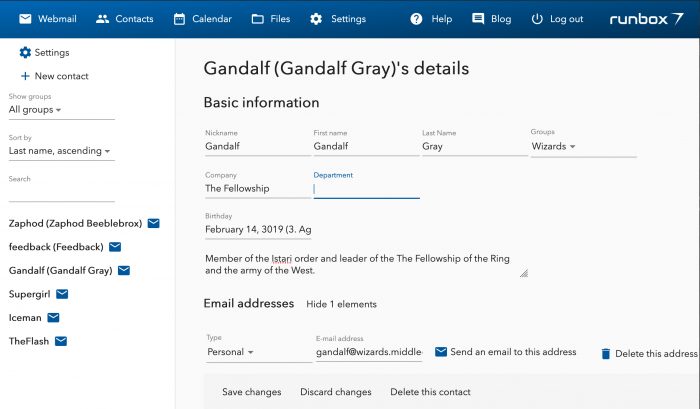
The first thing you’ll notice after clicking Contacts in the main menu in Runbox 7 is the beautiful and smooth user interface.
Runbox 7 Contacts is built with the same Angular framework that powers the Runbox 7 Webmail, and you will recognize its design components and interactive functionality.
New Contacts storage (CardDAV)
One of the key parts of the new Contacts is how we store your contacts on the servers. So far they’ve been stored in a proprietary database, with no other way to access them than through the Runbox 6 web interface.
This has been an annoyance to those of you who would like to use your contacts across many different apps and devices.
From now on in the new Runbox 7, all contacts will be stored on a CardDAV server – an open standard for sharing contacts and address books between different devices.
The advantages of Runbox 7 Contacts
If you know what CardDAV is, chances are you were eagerly awaiting this and need no further encouragement to use it. If you’ve never heard of it before, here are two key benefits it has over the existing system
First of all, Runbox 7 uses the standard vCard for representing the contacts. You may have heard the name before — if you ever sent a contact to someone over an SMS for example, it was a vCard. Using vCards in Runbox 7 Contacts means that much more flexibility when it comes to the information you can store.
vCards in Runbox 7 and CardDAV can store everything Runbox 6 can, and more — as many emails, phones and addresses as you desire, all categorized. Pictures, links to social media accounts, messengers, public keys for encryption; whatever you can think of, it’s probably there.
Second, you can access your Runbox 7 Contacts everywhere. No need to even use the Runbox 7 app — you can use any email client, any contacts app on your computer or your phone, and you’ll have access to the same contacts everywhere.
Add them on your phone, edit them on your laptop, and then they’ll still be available Runbox 7 when you compose a new email. Runbox 7 Contacts contains all the information that you need to set up any other apps that you use.
Using Runbox 7 Contacts
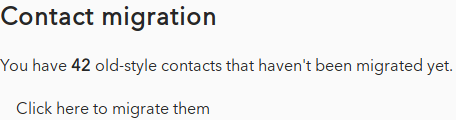
Until you migrate your contacts they will not be available for synchronization yet. Migrating them will move them over to CardDAV and give you all the glorious new features of Runbox 7 Contacts.
Try out the new Runbox 7 Contacts by logging into Runbox 7 and clicking Contacts in the main menu.
And let us know what you think over in the Runbox 7 Forum!