In an age where digital communication is essential, the tools we use to connect can significantly impact our mission and reach. We are committed to fostering a sustainable future, and support those who work tirelessly to protect our planet. As part of this mission we offer free email services to environmental organizations.
Who We Are
Runbox is an environmentally conscious email service provider that prioritizes privacy, security, and sustainability. Based in Norway, Runbox operates on renewable energy and aims to minimize our carbon footprint. Our services are designed to be user-friendly while offering advanced features that cater to both individual users and organizations.
Supporting Environmental Organizations
This program is part of our broader commitment to fostering a sustainable future and supporting those who work tirelessly to protect our planet. It reflects our dedication to supporting causes that align with our values. Effective communication can lead to increased awareness, greater community engagement, and stronger advocacy efforts. This support helps create a network of informed and active citizens dedicated to environmental causes.
Runbox is dedicated to providing sustainable email services from the heart of Norway, where strict privacy regulations safeguard your data. We’re excited to introduce 3-year plans that offer a 20% discount. By choosing Runbox, you support sustainable practices that make a positive impact on the environment while enjoying fast, secure, and privacy protected email services from Norway.
We pride ourselves on delivering premium email services at an affordable price. In fact, we have not increased our prices since our company’s inception, and at the same time we have added substantial storage to all our plans. In a time when price hikes on essential services have become the norm, we believe in offering you predictability and stability for a service as vital as email.
In today’s digital world, privacy and security are more important than ever. As we navigate online communications, it’s important to understand how encryption can safeguard our emails. Let’s explore what encryption is, how it works, and why you want to consider using it.
What is Encryption?
When you send an email without encryption, it’s like sending a private message on a postcard – anyone who handles it can read its contents. At its core, encryption works by converting the readable data of an email into a scrambled format. Basically, the contents of that email turns into gibberish so that nobody can read it. The point is to keep the email private while it’s in transit from you to the recipient.
Even though most email services use some form of encryption for data in transit, this is not the same as end-to-end encryption. With end-to-end encryption, only the sender and the recipient can read the message. This method effectively prevents anyone else, including email providers, from accessing the content of your messages.
While many of us might feel that we have little to hide and aren’t overly concerned about others reading our communications, it’s important to understand how our information could be accessed. Encryption helps to safeguard our personal information, which may contain sensitive details about our personal finances, family matters, or other private information.
You’ve been happily using free email for years, and haven’t thought much about it. The problem is that it’s not truly free—you’re paying with your privacy. In the world of digital communication, you become the product. Let’s dive into what it means.
1. Free is not free
With countless services offering “free” email accounts, it’s easy to assume that we can communicate without any cost. But companies that offer free email typically rely on advertising revenue, which means they collect vast amounts of data about our habits, interests, and communications. They use this information to tailor advertising, and that’s how they make money.
Email aliases are great – they help organize emails, reduce spam and protect our identity. But sometimes we need a quick way to create an alias without having to log in to our account to set it up. That’s when we can use plus-addressing, or subaddressing.
You simply add a + to your email address followed by a tag.
Any email sent to a plus-address is delivered to your account as usual. The message is still addressed to the plus-address, and you can use this in various ways to manage your email.
Plus-addressing benefits
Make up addresses on the fly without having to set anything up in your Runbox account.
Works with any email address, alias or domain.
Use a plus-address to identify sites where you used your email address.
Plus-addresses can help hide your main email address.
Use a different tag for each site so that if one has a data leak you know which one it is.
Filter email to specific folders based on the plus-addressing.
Create a filter to delete email to that particular plus address if it starts receiving spam.
Plus-addressing and email aliases are great tools to manage your email. With a Runbox account you get unlimited plus-addressing and 100 email aliases. If you have your own domain name, you get unlimited aliases. Check out this post for more info about aliases.
You can get more details about plus-addressing here.
To learn about how to create email aliases, check out this blog post.
Do you use email aliases? Aliases are a great tool that can help protect your identity, reduce spam, and organize your inbox.
Aliases are alternative email addresses that you can use to separate emails. Instead of using the same address for everything, you set up different aliases for online subscriptions, registrations, newsletters, social media, business contacts and so on. Any category that works for you. You can use your main address for friends and family, or create another alias.
All your aliases are set up under your main email account, and is delivered to your primary inbox. You can even set up filters so that mail is separated into specific folders in your account.
Not only will aliases give you another layer of anonymity, it also gives you control over your information and makes online tracking more difficult. Having aliases can help prevent someone hacking your main email account, and helps protect you from phishing attacks. If one of your aliases starts to receive lots of spam, you can easily delete the alias and set up a new one.
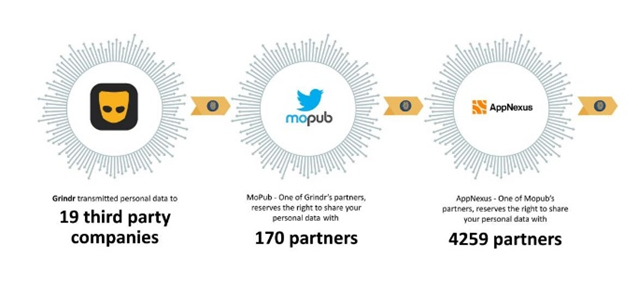
Oslo District Court has found Grindr’s sharing of personal data illegal as a result of the Norwegian Consumer Council complaint from 2020. Accordingly, Grindr has to pay EUR 5 million, as fined by the Council.
Our guardians of personal data and privacy: NDPA, NPAB, and NCC
As we have written multiple times in our blog series about GDPR and consequences of this EU-regulation, Norway has a long history of protecting citizens’ personal information. It started out with the first Personal Data Act implemented in 1978 with the purpose of protecting the individual against privacy being violated through the processing of personal data. The law was updated with GDPR clauses in the year 2000.
In 1980, the Norwegian Data Protection Authority (NDPA) was established as an independent authority whose task is to monitor compliance with the Personal Data Act. It is important to note that the NDPA has two roles: supervisory authority and ombudsman.
The NDPA decisions may be appealed to NPAB, Norwegian Privacy Appeals Board (Personvernnemda), whose decisions are final.
During recent years, another Norwegian governmental public body, the Norwegian Consumer Council (NCC), whose role is to protect consumers’ interests, has become involved in privacy, more precisely the misuse of personal data that big tech companies are involved in. As a governmental-independent agency, the NCC is free to chose the cases they want to work on.
Sharing of personal data is illegal without specific consent: The Grindr case
Recently, the NCC has put effort into the task of preventing the big tech companies from using personal information for surveillance-based marketing that the users have not consented to. Neither have users given consent to how personal data is transmitted to the companies’ partners.
When we go online or use apps, we are being tracked. Companies collect our personal data by tracking us across the web sites we visit. They build profiles on us based on our browsing history and online behavior. They want to sell us their products and services, and the more they know about us the better they can use this data to manipulate our behavior.
You know those ads that pop up everywhere after you looked up something? After you’ve looked up a new car, car ads follow you around all day. You research a vacation to Alaska, and travel ads show up everywhere. This is the result of targeted advertising, which is based on data they collected on you. Some call it surveillance capitalism, and it’s big business.
Privacy is about how your data is collected, processed, stored and used. It’s about maintaining control over your personal information and your identity. Privacy isn’t about hiding secrets, it’s about keeping your personal information safe from people who can do harm.
Suddenly you are noticing strange things happening with your email. You’re receiving email messages about login attempts, password resets and two-factor authentication codes, and your friends and family are wondering why you’re sending them weird emails. You can’t even log in to your own email account and you’ve been bumped out of your social media accounts. What is going on? Your email might have been hacked.
Don’t panic… but act quickly. You can minimize a lot of damage if you act fast and methodically. Because your email is a gateway to all your online accounts, like banking, shopping, social media and streaming, it can potentially be a goldmine for a cyber criminal if they gain access. Here’s what you can do.
There’s an uptick in phishing emails again. Here’s a refresher.
In the past few weeks there have been a series of phishing attacks aimed at a small subset of Runbox customers. The goal of these scams is to trick unsuspecting email users into clicking on malicious web links and entering their Runbox username and password, enabling the scammers to steal their password.
At Runbox we are constantly on guard against phishing attacks against our customers, and here we take a closer look at this increasing problem and some simple steps you can take to protect yourself.
As a summary, ensure that you check:
The From address. Phishing messages almost always come from a random email address that do not match our list of Official Runbox Email Addresses.
The messageaddresses you by name. Scammers typically only have lists of email addresses without any first or last names, so if the message does not address you by your first and last name it is likely to be a scam.
The legitimacy of any email with links. Check where the link will actually take you. Hover over it with your mouse, and you can see whether it will in fact take you to some random address not associated with Runbox at all.
Any false urgency. Runbox will never pressure you to act suddenly. Scammers may try to create a sense of urgency to persuade you to do what they’re asking.
What is phishing?
Example of a recent phishing message
Phishing is a type of cyber attack in which an attacker attempts to obtain sensitive information such as usernames, passwords, or credit card details by posing as a trustworthy entity via email messages.
The word “phishing” is derived from fishing and refers to using lures to “fish” for sensitive information. Phishing attacks typically use social engineering to gain a victim’s trust, and use spoofing such as faking an email address or URL to make the attack appear legitimate.
When phishing attacks are targeted at certain services or individuals it’s called “spear phishing”, and in this case they appear to be sent from Runbox Support, the Runbox Team, or other similar official sounding names.
Email users who are unfortunate enough to receive a spear phishing message and end up divulging their Runbox login details can end up having their Runbox accounts hijacked and used to send spam, which then forces us to suspend the accounts until the customer can regain access.
With access to an email user’s account the attackers may then be able to access their personal information and use it to commit fraud or identity theft, which can in turn result in financial loss or worse.
Naturally such account hijacking causes much confusion for the affected customers in addition to the privacy intrusion and consequences for the recipients of the spam being sent, which is often another phishing scam. The phishing then continues to cascade to new groups of innocent users of other email services, while exploiting people’s trust and rarely being caught.
It is important to understand that these scammers are criminals, and that being tricked into disclosing any login details can have serious consequences.
How to spot phishing
The easiest way to see whether a message is in fact from Runbox is to check the From address, as phishing emails almost always come from a random email address not on any Runbox domain names such as runbox.com.
Another important clue is whether the email addresses you by name, or whichever name you have entered in your Runbox Account details. Attackers typically only have lists of email addresses without any first or last names, so if the message does not address you by name it is likely to be a scam.
The third way to check the legitimacy of any email which asks you to click on a link, is to check where the link will actually take you. Some phishing links look like they link to a Runbox web page, but if you hover over it with your mouse, you can see that it will in fact take you to some random address not associated with Runbox at all.
If in doubt, go to our main website Runbox at https://runbox.com for information, or contact us via Runbox Support at https://support.runbox.com.
Do not be fooled or threatened by the scams
Most phishing emails have a very urgent and even threatening tone, trying to scare the recipient into acting right away to avoid having their account shut down or disrupted.
The scammers might even read our blog or other web pages and notice that we have two webmail versions, and subsequently send messages claiming that if you don’t switch to the newer version within X days, then your account will be shut down, for instance.
Legitimate messages from the Runbox Team will always give notice about something happening in the future, or optional new features.
Catching the scammers
We are constantly working to improve our defenses against phishing attacks, spam, and viruses, and we take immediate action to remove spear phishing messages as soon as we become aware of an attack.
If you have received any scam emails like the ones described above without responding in any way then your account is perfectly safe. We do however appreciate you notifying us via Runbox Support at https://support.runbox.com so that we can take steps to protect you and our other customers against the attack.